
VMware Cloud Director Availability is a Disaster Recovery-as-a-Service (DRaaS) solution. Between multi-tenant clouds and on-premises, with asynchronous replications, VMware Cloud Director Availability migrates, protects, fails over, and reverses failover of vApps and virtual machines. VMware Cloud Director Availability is available through the VMware Cloud Provider Program.
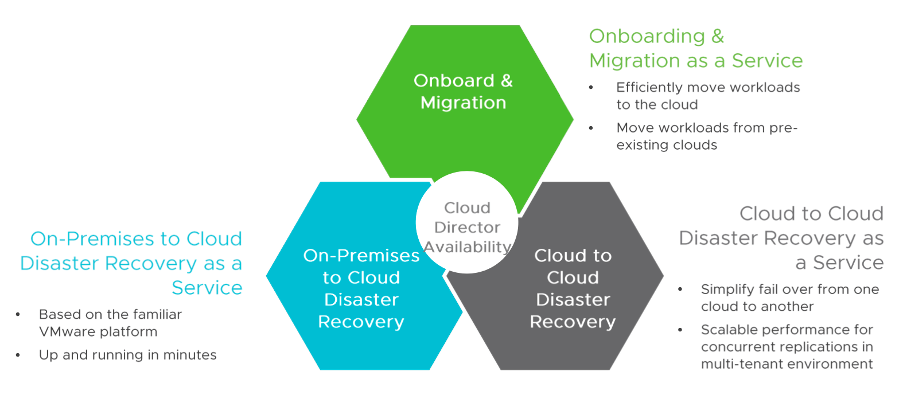
VMware Cloud Director Availability introduces a unified architecture for the disaster recovery and migration of VMware vSphere ® workloads. With VMware Cloud Director Availability, the service providers and their tenants can migrate and protect vApps and virtual machines:
- From an on-premises vCenter Server site to a VMware Cloud Director site.
- From a VMware Cloud Director site to an on-premises vCenter Server site.
- From one VMware Cloud Director site to another VMware Cloud Director site.
Use Cases
VCDA supports two different use cases – Disaster Recovery and Migration of vApps/VMs. Both of them rely on the replication of virtual machines. In both cases at least one of the sides is a VMware Cloud Director, managed cloud and the other side could be another VCD cloud or vCenter Server. VCDA cannot protect or migrate bare metal servers or VMs managed by non-VMware hypervisors.
Disaster Recovery A tenant can purchase DRaaS provided by a public cloud and based on VCDA to protect its virtual machines running in its on-premises datacenter. The Cloud provider will assign a portion of compute, storage, and network resources from its own cloud and will group them in an Organization Virtual Data Center (OrgVDC) to the tenant. Also, the cloud provider will enable this OrgVDC (respectively the tenant) to protect its on-premises virtual workloads to the cloud with specific parameters like minimum RPO, bandwidth control, the direction of protections, and others. This will allow the tenant to failover its VMs in case of an outage in its on-premises data center.
Migration When the tenant plans to do planned migration of workloads to the cloud it may use the Migration workflow which simplifies the process. When a “New Migration” is configured VCDA starts replication of vApp/VM from source to destination. When initial sync is completed source VM is powered off and any delta generated in the source site is synchronized to the destination. At the destination side, VCDA requests from VCD to construct a new vApp/VM from replicated data and powers it on. Migrated workloads could be customized to make them ready for operation in the new virtual datacenter.
Deployment Models
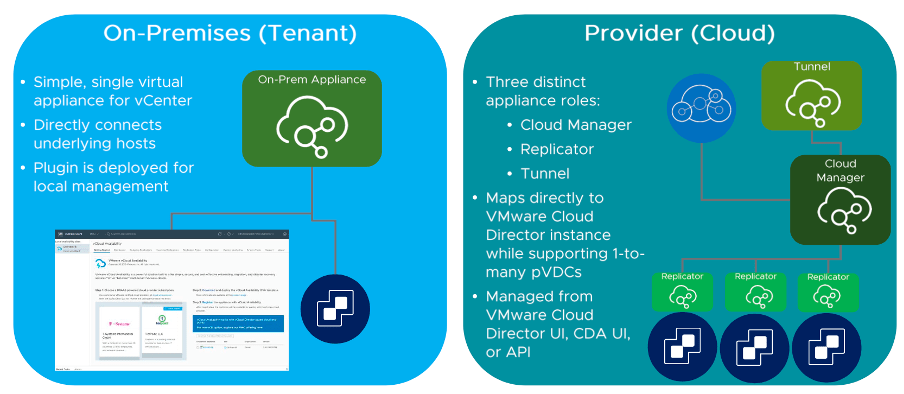
There are two types of Deployment Models: Tenant and Provider Model. In an On-premises or Tenant deployment model, you can deploy the appliance in the local datacenter and integrate it with the Cloud side of the VCDA components. Once the integration is complete, you will be able to protect and migrate the workloads. And if you have to protect workloads from one vCloud Director instance to another vCloud Director instance, the Provider deployment option is used.
VMware Cloud Director Availability Architecture
In the cloud, VCDA requires existing VMware Cloud Director installation to be fully operational. This means VCD has to be installed and configured and ready to provide tenants with compute resources through Organizational Virtual Datacenters. VCDA site concept in the cloud consists of the following set of appliances:
• One VCDA Manager appliance
• One VCDA Tunnel appliance
• One or more VCDA Replicator appliances
Role of each VCDA Components
Tunnel
Tunnel appliance is the single-entry point to VCDA instance in the cloud and its role is to handle incoming management and replication traffic. Tunnel handles both data and management traffic and forwards it respectively to cloud replicators and manager.
Manager
Manager is responsible for communication with VMware Cloud Director and through this communication VCDA discovers resources (OrgVCD, storage policies, datastores, networks, etc) managed by VCD and used by tenants. It also provides UI and API interfaces to use VCDA and interact with it. Another role of the manager is to communicate with local and remote replicators and receive data from them about each protected/migrated workload.
Cloud Replicator
Cloud Replicator is responsible to move replication data to and from ESXi hosts in the cloud.
For outgoing replications/migrations it communicates with VMKernel interface of an ESXi host and captures and encrypts replication data, optionally compresses and encrypts this data and sends it to a remote replicator which can be another cloud replicator or on-premises replicator.
On-premises Replicator
On-premises replicator is deployed in tenant on-premises datacenter. It creates a pairing relation to VCDA in the cloud and can protect and/or migrate VMs running locally to the cloud and vice versa.
What’s New in VMware Cloud Director Availability 4.3.1
VMware Cloud Director Availability 4.3.1 now supports Migrating vApp Templates. The templates represent primary copies of virtual machines, ready for instantiating. Migrating vApp templates to a site allows the tenants to deploy consistently configured virtual machines across multiple VMware Cloud Director instances.
Previous VMware Cloud Director Availability versions supported creating L2 sessions by selecting Edge Gateways scoped only to an organization VDC in VMware Cloud Director. VMware Cloud Director Availability 4.3.1 now also supports selecting Edge Gateways that are scoped to a data center group.
This VMware Cloud Director Availability release also includes important resolved issues and updates of third-party libraries that provide security fixes.
Upgrade
VMware Cloud Director Availability 4.3.1 supports an in-place upgrade directly from versions 4.1.1, 4.2.1, and 4.3. When upgrading from versions 4.0.x or 4.1, first, upgrade to version 4.2.1, then upgrade to version 4.3.1.
For more information, see Upgrading in the Cloud and Upgrading On-Premises.
Configuration Maximums
For the tested uptime, concurrency, and scale limits, see VMware Configuration Maximums.
Caveats and Limitations
Note: The VMware Cloud Director Availability vSphere Client Plug-In requires vSphere Client support. With earlier vSphere versions, to configure replications use the VMware Cloud Director Availability Tenant Portal. Alternatively, in VMware Cloud Director use the VMware Cloud Director Availability plug-in.
For interoperability between paired sites with mismatching VMware Cloud Director Availability versions, see Managing Connections Between Cloud Sites.
For interoperability between VMware Cloud Director Availability and other VMware products, see VMware Product Interoperability Matrices.
To know more about VMware Cloud Director Availability, visit: https://www.vmware.com/in/products/cloud-director-availability.html


Great stuff
LikeLike